Financial integrity
Two people on every payment. Receipts stay as written. Fee reminders wait in a queue until someone Accepts, never a silent blast.
Your school's admin, already drafted. AcademiaLynk prepares the fee reminders, timetables, results and parent updates for you. Your staff just tap Accept, Edit or Decline. One system for fees, attendance, exams and families, built for your school.

Platform Demonstration
Get a quick look at how AcademiaLynk streamlines fee collections, drafts teacher timetables, automates BECE mock exams, and gives your school administration the daily clarity needed to lead with confidence.
Two people on every payment. Receipts stay as written. Fee reminders wait in a queue until someone Accepts, never a silent blast.
Mocks follow the real paper. Remarks are drafted for Accept or edit. JHS 3 revises from the school’s practice library on their own page.
What it does
Running a private school is not only about filling registers and collecting fees.
Instead of juggling notebooks, Excel, WhatsApp, and separate tools, AcademiaLynk joins the parts and proposes the next step. Staff Accept, edit, or Decline. Receipts, report cards, and the parent page use that same record.
Built for Ghanaian private schools (creche through JHS) that want one way of working across fees, attendance, exams, HR, and communication.
Propose. Review. Carry on. Under that loop, the board can trust the money, and JHS 3 can practise from the school’s own paper library.
Developed in Takoradi. One package for the whole school: staff dashboard, parent page, and student page.
Beyond marking a register: fee balances, authorised payments, staff attendance, and who still needs a decision, so management sees the school, not just the next transaction.
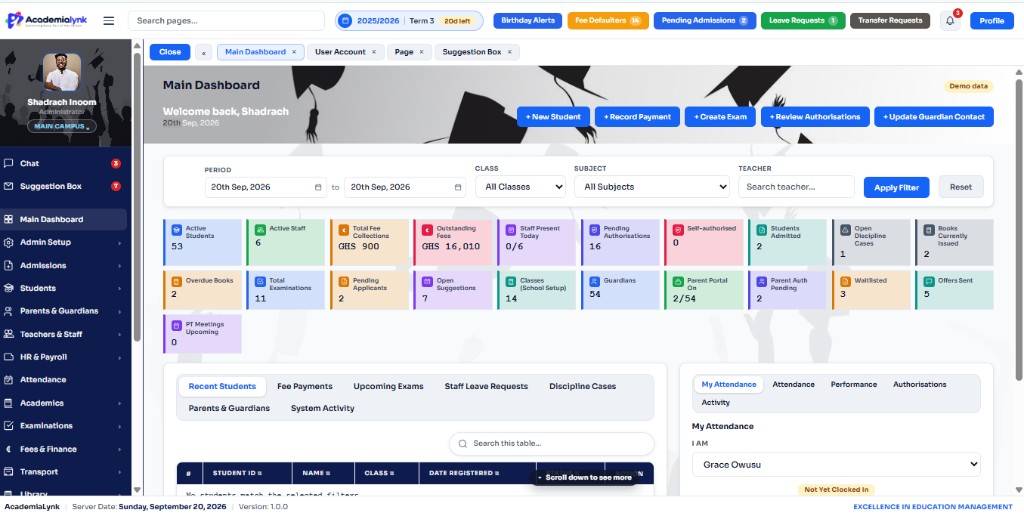
The morning screen brings fees, attendance, exams, and notices together. The system proposes; you Accept or correct. Built for decision-makers, not only for data entry.
Parents and students open their own page on the phone. Staff carry the same school on the dashboard: one record, every person.

How it works
The master loop for every part of the day. AcademiaLynk drafts from the school’s own data; staff review in minutes. Financial integrity and BECE readiness are how you prove it, not separate stories.
 01
01Who the school is, what it offers, how to reach them, and a place for a family to start an admission.
 02
02One screen for the day. The system proposes the next step; you accept, edit, or decline.
 03
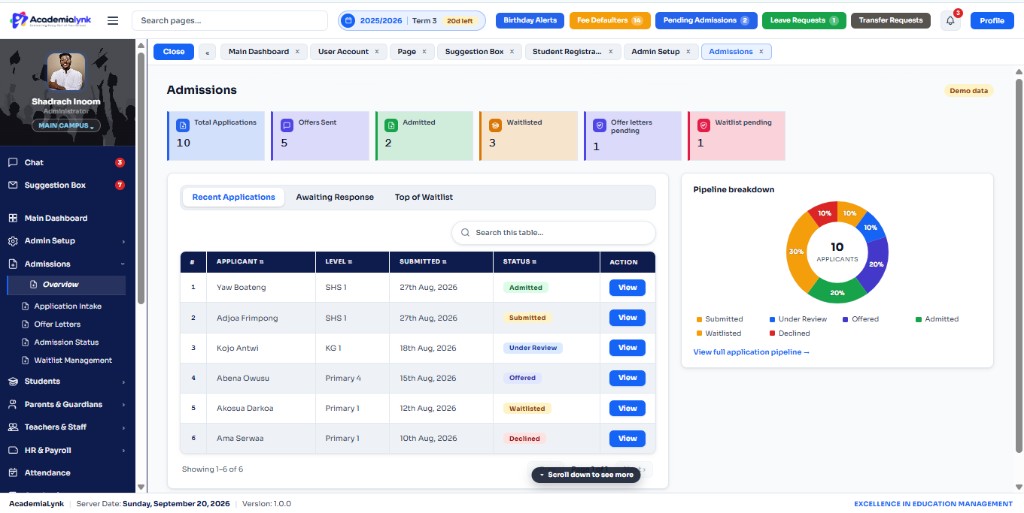
03Applications from the website land here, with offers and the waiting list.
 04
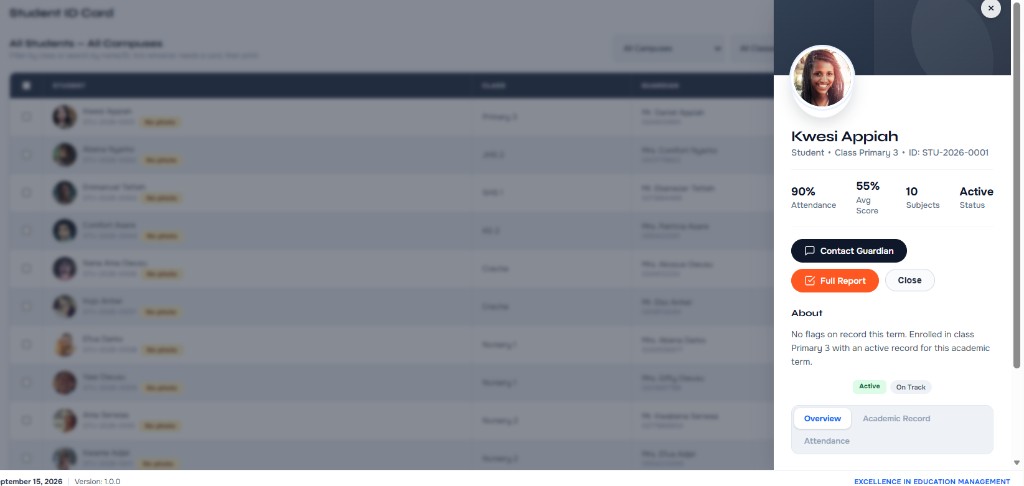
04The pupil record, health, promotion with auto-holds, and transfer. An approved photo is the face used on the directory, the ID card, and the report.
05Results, attendance, fees, and the timetable on the family’s own page. Gate pickup tells the class teacher the parent has arrived.
 06
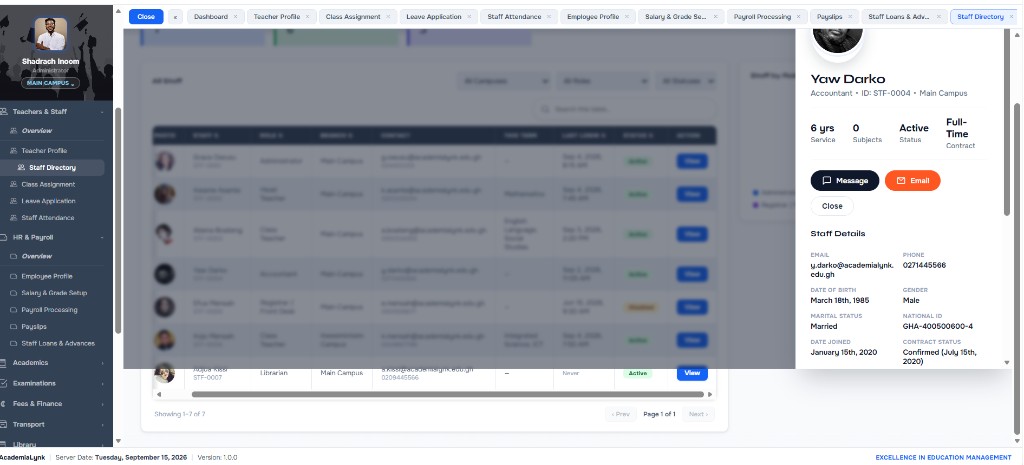
06Profiles, classes, leave, and who is in school. Every staff member clocks in from their own dashboard. The administrator sees the time.
 07
07Propose the whole class present, or copy yesterday, then mark only the absences and save. Staff clock-in records the time, with late marked after 7:30.
08The parent taps “I am at the gate”. The class teacher sees a waiting list for their class: the child, the parent, and the time, and sends the child. The day’s list prints with the school heading.
09See who is on the student portal now, when they were last seen, how long they stayed, and which pages they opened today.
 10
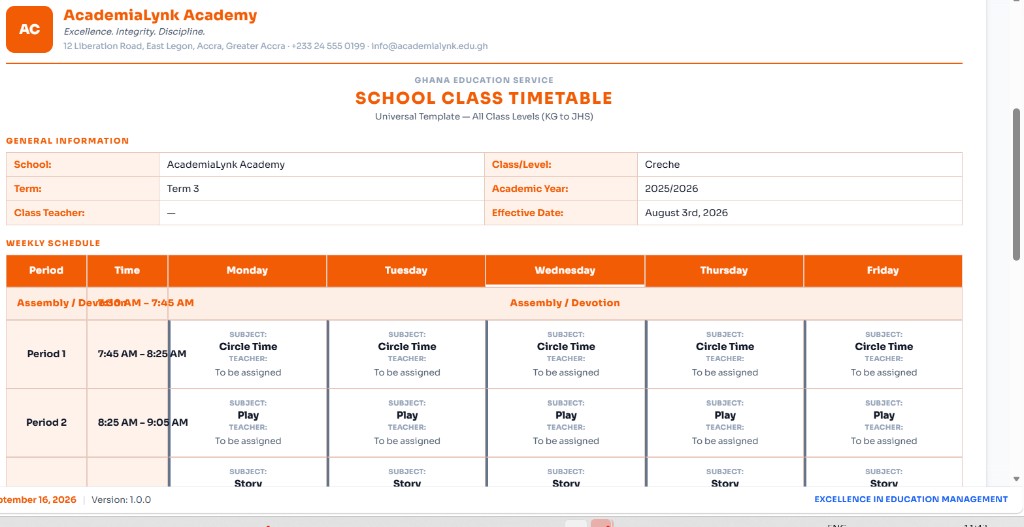
10The timetable drafts itself from classes and assignments. Lesson and work plans stay joined to exams.
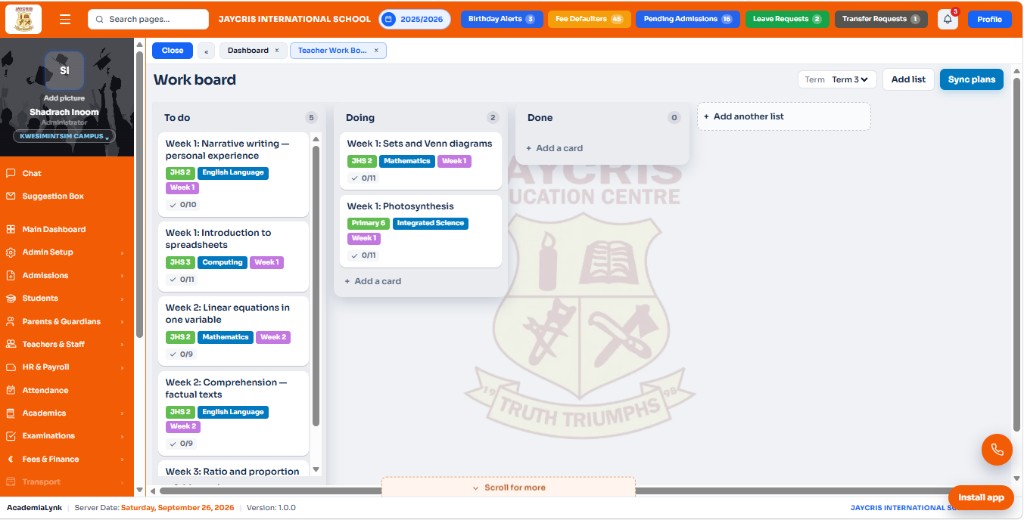
11Work-plan weeks land as cards. Teachers tick the breakdown, drag To do → Doing → Done, and Done can propose exam questions.
 12
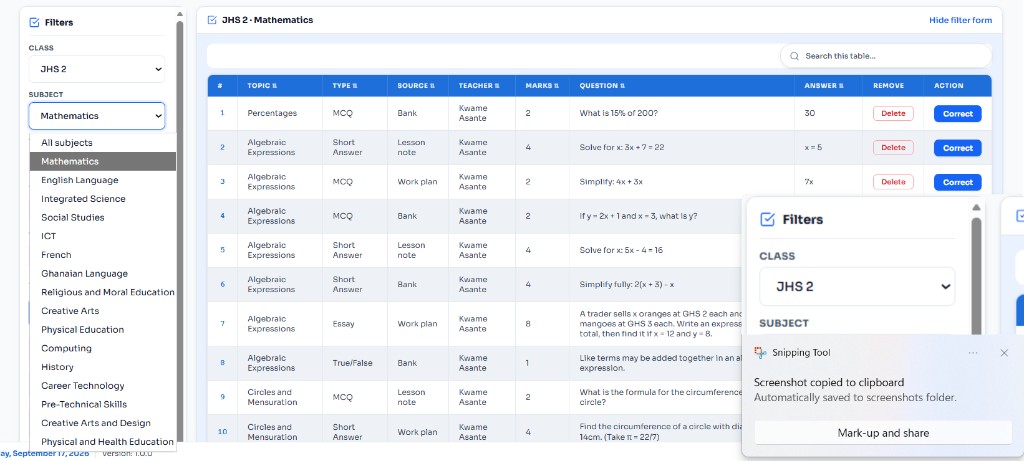
12Questions proposed from lesson notes: teachers Accept or Decline. Papers and marking schemes follow from what they accepted.
 13
13A proposed arrears SMS queue: Accept, edit, or skip each reminder. Two people still confirm every payment.
 14
14Grades, payslips, SSNIT, and PAYE, computed for review before finalize.
 15
15Notices and SMS to the person they are for, never sent silent in bulk without a review.
 16
16Routes, books, and what the school holds.
 17
17Report-card remarks drafted from averages for Accept or edit. Printed reports keep the school heading on the first page, theme-coloured column headings, lines between columns, and a page number. A report with more than six columns prints in landscape.
Ready to get started?
Book a demo and we will show you the school’s day in AcademiaLynk.
How we do it
Four steps from first visit to first day. We set AcademiaLynk up around how your school already runs.
We map your campuses, classes and who does what.
Your school is set up from that map, not a blank form.
Fees, roles, classes and the modules you use, ready before day one.
Every staff member gets their own login, and sees only their part.
Want to know more?
For families
A parent is at the gate, on the way home, or at the table after work. Results, attendance, the timetable, and school notices open on the phone first. The same page is there on the web when they sit down.

For students
Results, the timetable, and how they are doing sit with the student. JHS 3 can practise BECE-style papers on that same page: real subject questions, not empty topic titles. Notices arrive there, and the pupil can vote or send a note back.
One school
Staff review what the system proposes. The student, the parent, and the school’s website open their own part of that same record.
Propose → Accept on fees, marks, attendance, and notices. Clock in from any page. Sign-out ends the session on the server.
Open staff dashboardResults, the timetable, and notices on their own page. A new photo waits until the class teacher approves it.
Open student portalThat same child, on the phone. At pickup, tap “I am at the gate” and the class teacher is told.
Open parent portalWho the school is, and where a family starts an admission.
Where we win
The master loop stays the same. Financial integrity and BECE readiness are how a school proves it: not separate products competing for attention.
Questions are proposed from work plans and lesson notes. The teacher Accepts, Declines, or corrects. Only accepted items go into papers.
Propose the whole class present, or copy the previous school day. Mark only the absences and lates, then Save.
Every fee, expense, and purchase waits for a second person. Outstanding balances become a reminder queue: Accept, edit, or Skip, never a silent blast.
Mocks follow the real BECE structure. Report-card remarks are drafted for Accept or edit. JHS 3 revises from the school’s practice library.
Inside the platform
The morning screen, admissions, school setup, and the teacher work board: work-plan weeks broken into cards for the term.
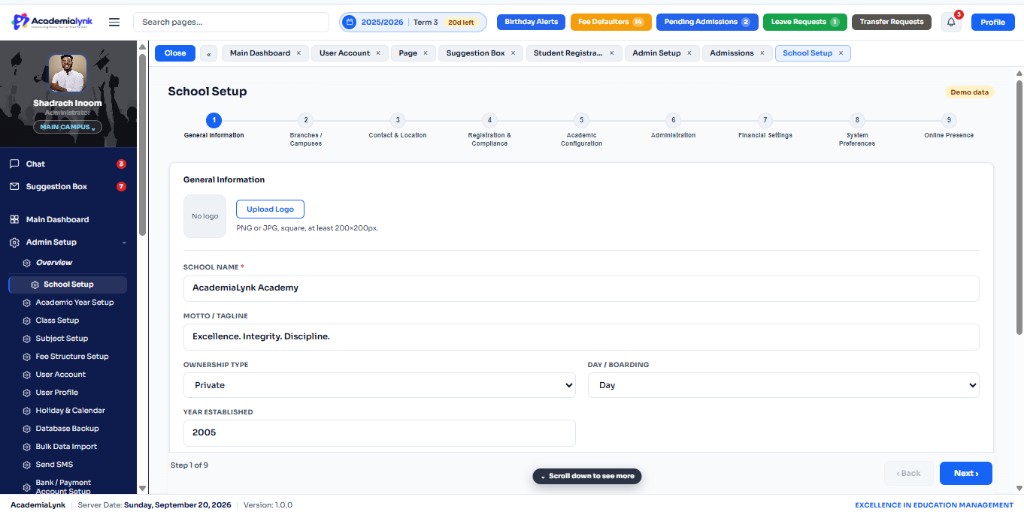
Each school gets
The website says who the school is, what it offers, and how to reach them. A family starts an admission there. The school does not collect those forms in a separate book.
Every admission, and the rest of the school, is watched from one dashboard. The system proposes. You Accept or correct. You follow the steps.
Pricing
No monthly subscription. A one-time License & Setup fee, then an annual or termly Management & Support fee for hosting and the support line. SMS credit stays with the school’s own provider.
Paid once: the school owns the system outright
One-time fee
Contact teamAnnual or termly: keeps the system running
Service fee
Contact teamRequired: funded and owned by the school
School-funded
Contact teamGES classes, CSSPS, BECE mocks, SSNIT and PAYE: built in, not bolted on.
Attendance, exam questions, fee reminders, report remarks, and promotion holds are drafted for you. Teachers Accept, edit, or Decline; they do not start from a blank page. Financial integrity and BECE readiness sit under that loop as proof, not rival pitches.
Bursars see finance, teachers see their classes, parents have their own login.
Lesson notes feed exam proposals. Accepted questions feed papers and marking schemes. Fees and demerits flag promotion holds. One school, connected.
Talk to us
A named person will pick up. This is not a dashboard login.
Tell us about the school. This form does not create a dashboard login.
It tells people who the school is, what it offers, and how to reach them. A family can start an admission on that page.
They arrive in the same dashboard the school uses for the rest of its work, so the school watches everything in one place.
No. It proposes: exam questions, attendance defaults, fee reminders, report remarks, promotion holds, and the teacher or bursar Accepts, edits, or Declines. Money, promotions, and live papers still need a human sign-off.
Lesson notes and work plans feed proposed questions. Teachers Accept what they want in the bank. Auto exam generation builds Set A/B/C only from accepted items, then a second person unlocks print.
Use Book a demo and tell us about the school. We will contact you to arrange a time. The form does not create a dashboard login.
The day’s work stays on the phone. It syncs when the connection is back, so the school does not lose the record and does not have to stop to buy data.
Each staff member clocks in from the dashboard. The time is saved to the school’s own database. The administrator and principal see the times on Attendance. Late is after 7:30. Signing out ends that login on the server.
The parent opens the portal and taps “I am at the gate”. The class teacher gets the alert and sees who is waiting for their class. They send the child. The school can print that day’s pickup list.
The student or parent submits a picture. It stays pending until the class teacher approves it. After that, the same picture is used wherever that student’s face is shown.